Rookie Understanding of AI
A beginner-friendly introduction to AI concepts and how modern language models work under the hood.
This quick guide is for absolute beginners -- students, creative folks, or anyone curious about AI but not sure where to start. In just 15 minutes, you'll get how AI handles text, what tokenization, embeddings, and GPT mean -- and how they all connect in everyday tools like chat assistants and search engines.
AI in One Minute: The Big Picture
AI = software that learns patterns from data. It's built on three pillars:
- Data (examples it learns from)
- Model (the pattern learner)
- Task (what you want it to do)
Ever noticed how YouTube suggests videos you might like, or how your phone autocorrects your typos? That's AI learning patterns -- simple and powerful.
Language is Hard for Computers: Why We Need Tricks
To a computer, plain text is just messy characters. All tasks are finally converted into 0s and 1s. That's why we need:
- Tokenization: Cutting text into manageable bits.
- Embeddings: Turning those bits into meaningful numbers.
Tokenization: Breaking Things Down
When you see the word tokenization, you might guess it means breaking something into pieces -- but why do we need to do this?
Think about how you read this blog right now. You don't read the whole page at once -- you read word by word, sometimes even pausing at punctuation. Machines work the same way. They can't understand a sentence all at once; they need the text split into smaller pieces called tokens.
Different models tokenize the same sentence differently, and token limits apply -- go over, and your input might get cut off.
Some common tokenization types:
- Character tokenization -- splits text into individual characters. Example: hello! -> [h, e, l, l, o, !]
- Word tokenization -- splits on spaces/punctuation. Example: unbelievable! -> [unbelievable, !]
- Subword tokenization (what most LLMs use: BPE, WordPiece, SentencePiece) -- splits words into frequent pieces.
- Byte-pair tokenization (GPT-style) -- works at the byte level, then merges frequent byte pairs. Handles any script, emoji, code, even unknown symbols.
Try it:
- https://tokenizer-zeta.vercel.app/ -- a custom tokenizer with a custom scheme
- https://tiktokenizer.vercel.app/ -- visualize tokens
Embeddings: A Map of Meanings
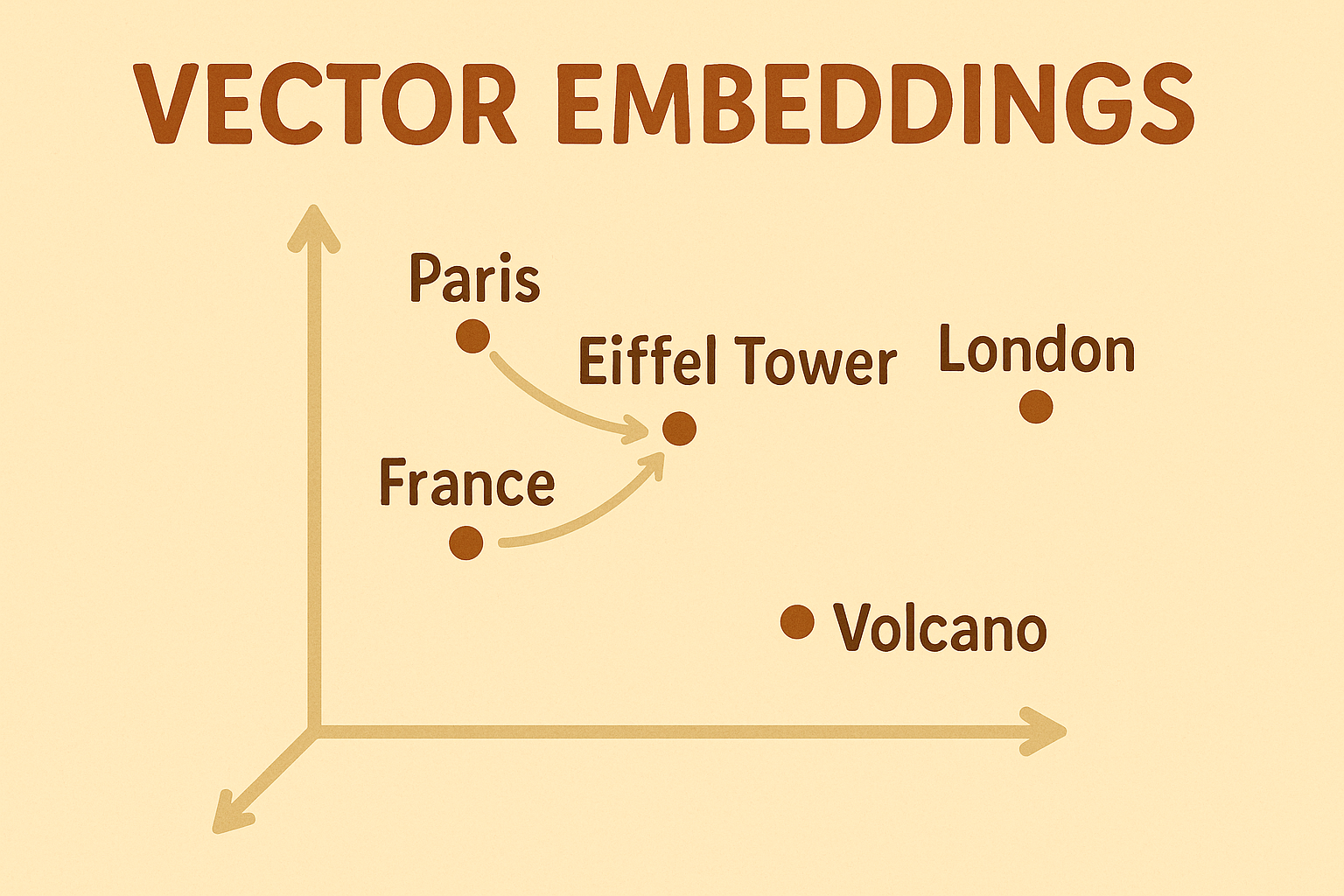
After tokenization, models still need a way to represent meaning. Since machines don't see words, they use numbers -- that's where vector embeddings come in.
Think of how your brain connects ideas. When you hear Paris, you might also think Eiffel Tower. Embeddings give computers a similar map -- each word, phrase, or document is turned into a vector (a list of numbers). Vectors that mean similar things end up close together in this multi-dimensional space; different things are farther apart.
Why this helps:
- Semantic search: 'capital of France' finds texts about Paris, even without exact matches.
- Clustering and deduplication: group similar sentences or documents.
- Recommendations: 'You might also like...' based on meaning, not just keywords.
- RAG: quickly fetch the most relevant passages to feed the model.
Try it:
- https://projector.tensorflow.org/ -- visualize and compare embeddings
- https://platform.openai.com/docs/guides/embeddings/embedding-models -- OpenAI embedding models
GPT: Generative Pre-trained Transformer
At its core, GPT is a next-token predictor: given some text, it predicts the most likely next token, then the next, and so on.
- Generative: it can produce new text.
- Pretrained: it learned from large amounts of data before you use it.
- Transformer: the neural network architecture it uses, powered by attention.
Think of GPT like a very smart parrot that read every book in the world and got great at predicting the next word. It doesn't really understand like we do -- it just gets good at guessing what comes next based on patterns. That's why it seems smart... but it can still be confidently wrong, so always double-check!
How It Works Together: From Text to Answers
- You type a sentence.
- A tokenizer slices it.
- Slices become vectors (embeddings).
- The model predicts the next tokens.
- Tokens are turned back into text.

Retrieval-Augmented Generation (RAG): Giving GPT a Notebook
GPT has a memory cutoff -- it won't know about events after its training date. That's where RAG comes in. Think of RAG as letting GPT flip through notes before answering. Embeddings help GPT find the right page in the notebook before writing its answer.
Where RAG shines:
- Chat over your personal notes, documents, or research papers.
- Customer support bots that always have the latest product info.
- AI tools for analysts that pull from live data.
Tokens, Costs, and Practical Tips
More words = more cost in most AI APIs. Every token you send or receive costs computing power. More tokens also risk hitting the context limit -- the maximum memory the model has per conversation.
Pro tip: Use the Role + Task + Context + Examples + Constraints structure for prompts.
You are an English teacher (Role). Correct this essay (Task). Here's the essay: ... (Context). Make 3 specific suggestions (Constraints).
Myths, Busted
- AI understands like humans -- No, it's pattern matching.
- More tokens = better answers -- Clarity matters more.
- Embeddings are just for search -- They're also for grouping, recommendations, and memory.
- GPT knows everything -- It needs fresh info for current events.
Conclusion
If you've made it here, you now have the mental map:
Text -> Tokens -> Embeddings -> GPT -> Answer
Next time someone says 'AI is magic,' you can smile and say: 'Not magic. Just math, maps, and some really clever parrots.'